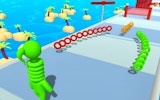
Chicken Runner Arcade Game

Reviews
💡Running Chicken offers a charming balance-based challenge that is easy to pick up but keeps you engaged. Collecting keys and coins adds a rewarding layer to each level. The skin customization gives a personal touch. It runs smoothly on all devices and is perfect for players of any age looking for a light, fun experience.
Description
Game Introduction
Running Chicken Online Arcade Game is a family-friendly endless runner-style game where players help a brave chick balance on a ball while navigating through various levels. The core objective is to collect coins and keys scattered throughout each stage while avoiding obstacles and traps. Released in April 2023, this HTML5-based game works smoothly on PCs, tablets, and smartphones, offering colorful, simple design that appeals to all ages. The game combines skill and fun, rewarding players for careful navigation and collection.
How to Play
Players control a chicken balancing on a ball, moving forward through levels. On touchscreen devices, use swipe or touch gestures to guide the chicken. On a PC, use the left mouse button and mouse wheel to help the chicken balance and progress. The goal is to collect as many coins and keys as possible while avoiding obstacles. Some obstacles require strategic collisions to proceed. Each level contains three hidden keys that unlock chests filled with coins, which can be spent in the in-game store.
Game Features
The game includes multiple levels with increasing difficulty, a coin and key collection system, and an in-game store where players can purchase unique skins for the chicken using collected jewelry. It supports full-screen mode for an immersive experience and offers simple controls that are easy to learn. The game is designed for short gaming sessions and is suitable for players aged 3 and up. Skin customization allows players to change the chicken's appearance.
Tips for Success
Practice balancing and timing your movements to avoid obstacles. Collect all three keys in each level to unlock chests for bonus coins. Use the store to buy skins that may provide visual cues or simply make the game more enjoyable. Take advantage of full-screen mode for better visibility. Regular play will help you master the controls and progress through harder levels.