
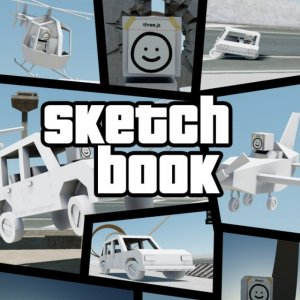
Sketchbook 0 Creative Sandbox
Reviews
Description
Game Introduction
Sketchbook 0 Creative Sandbox is an online game where players explore a collection of unique scenarios, each with its own tasks and environment. The core objective is to customize the visual world by adjusting daylight hours, shadow positions, sun locations, and adding or removing color shades. Whether you want a bright day or a dark night, the choice is yours. Built with WebGL technology, it offers smooth play on any modern browser, making it a vibrant playground for all ages. The game encourages creative expression through visual customization, allowing players to experiment with lighting and color to create their ideal atmosphere. Each scenario presents a distinct setting, from open fields to structured platforms, providing variety in exploration and interaction. The game is designed to be intuitive and family-friendly, suitable for both children and adults who enjoy sandbox-style creativity.
How to Play
Players use keyboard keys for movement and the mouse for interaction. Each scenario assigns specific keys for unique tasks. To start, choose a scenario and customize its look. Then, jump into a race by loading the plot and location, or simply drive around ramps to perform stunts. For aerial views, find a helicopter on one of the platforms. The game is intuitive and family-friendly, perfect for kids and adults. The controls are straightforward, allowing players to quickly learn navigation and interaction. The sandbox nature means there is no strict goal, encouraging free exploration and experimentation with the environment and vehicles.
Game Features
Key features include customizable day/night cycles and color schemes, diverse scenarios with different tasks, racing and stunt driving on ramps, helicopter flying for aerial exploration, and WebGL support for smooth browser-based gameplay. The visual customization allows players to change the mood of each scenario, from bright and sunny to dark and moody. The scenarios vary in layout and objectives, providing replayability. The inclusion of vehicles like cars and a helicopter adds variety to movement and exploration. The game runs entirely in a web browser without downloads, making it accessible on many devices.
Tips for Success
Experiment with different visual settings to create your ideal environment. Practice driving and stunt maneuvers to improve control. Explore all scenarios to discover hidden tasks and unique challenges. Use the helicopter to get a bird's-eye view of the map and plan your routes. Take your time to enjoy the creative freedom the game offers.
Player Comments
Sign in to comment
You must be logged in before posting a review or rating.
No account? Create one
No comments yet. Be the first to comment!